

Ebay, Amazon & Etsy Accounting Excel Database (Inventory Pedia)
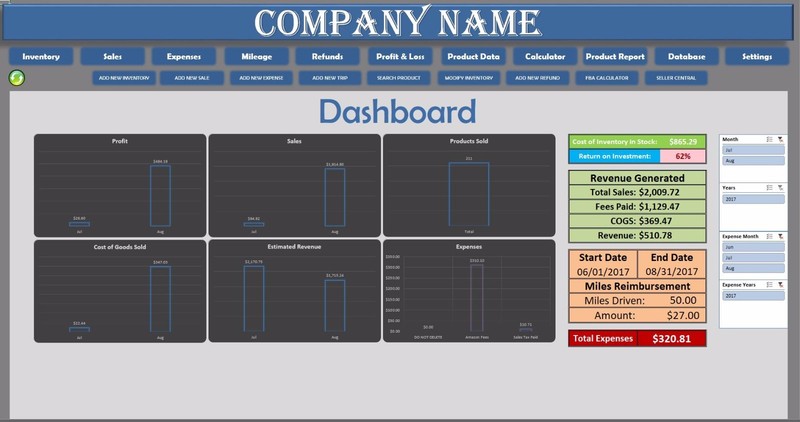
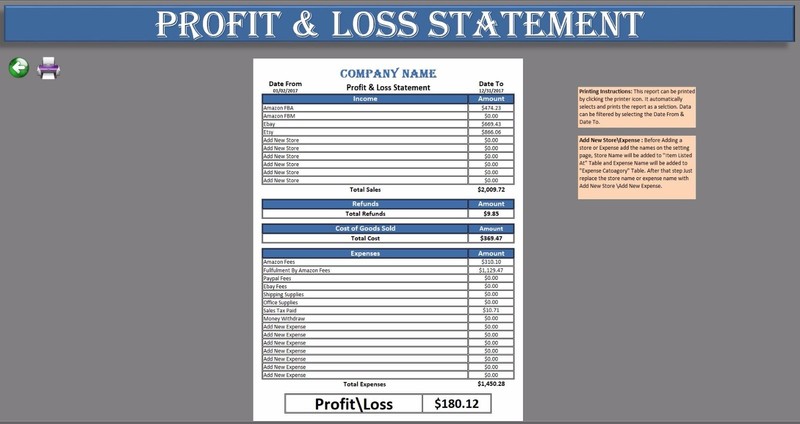
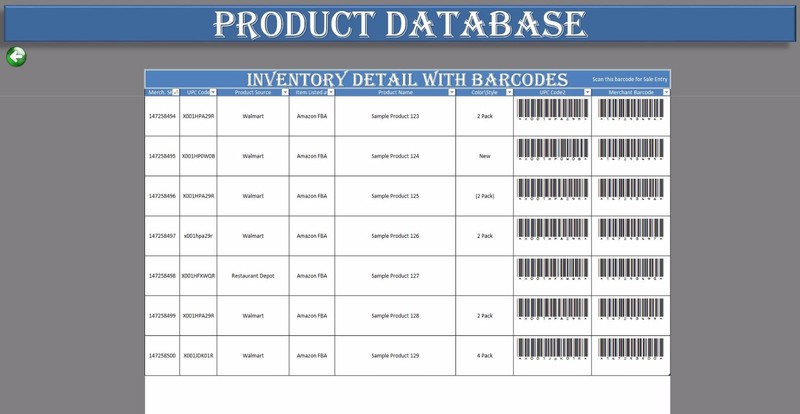
I am an Amazon FBA Seller, When I started selling on Amazon I was looking for a software which I could use to track my inventory, sales, expenses, refunds and miles driven for the business. I tried to find a cheaper software as I didn’t want to add a lot to my startup cost. After looking at various software’s, I couldn’t find anything less than $80. At this point, I decided to put my Excel Expertise to work and designed this application. Once the application was completed, I decided to share this application with other eCommerce sellers too as there are a lot of people who are struggling with their Ecommerce Business bookkeeping. This Database is a spreadsheet but when you start using it, it hardly feels like that you are using a spreadsheet. I have designed this application to make it easier for myself to track my inventory, sales, expenses, refunds and miles driven for the business. Data Entry is done by using forms. Barcode scanner can also be used to enter data. Dashboard Dashboard will give you updates on profit, Sales Products Sold, Cost of Goods Sold, Estimated Revenue, and Expenses by using the charts. This page will also keep you updated about you current Inventory in Stock, return on investment, Profit and Loss, Miles you drove your car for your business and the reimbursement amount. This page has filters where you can filter the data displayed on the Dashboard,Dashboard contains the links to all the sheets like, Inventory, Sales, Expenses, Mileage, Refunds, Product Data, Calculator, Product Report, Database, Settings.You will also be able to perform the following functions from the Dashboard Page. Add New Inventory, Add New Sale, Add New Expense, Add New Trip, Search Product, Modify Inventory, Add New Refund, FBA Calculator and Seller Central are the links to Webpages.Inventory Inventory page is displayed as a report. It contains Cost of Inventory in Stock and Cost of Inventory Purchased. You can filter the data by using Date column in the table. This report is easy to print for annual accounting purposes. Printing Instructions are available on this page. An option to data is also available on this page. · Add New Inventory Form To Add New Inventory, click on *Add New Inventory* Enter UPC Code, Purchase Date and Shipment ID Automatically populates, fill up the reset of the form and click save. Purchase Date can be modified. Fields marked with * are mandatory fields. · Modify Inventory Form To Modify Inventory, click on *Modify Inventory* Enter Merchant SKU, once entered, all the fields will automatically populate. Make and changes needed and click Save. Fields marked with * are mandatory fields. Sales Sales page is displayed as a report. It contains Total Sales, Total selling fees paid and Total Revenue Received. These totals are displayed as subtotals. So, if you filter the data by using data column in the table these values will change. Printing Instructions are available on this page. An option to data is also available on this page. · Add New Sale Form To Add New Sale, click on *Add New Sale* Enter Merchant SKU, once entered all the fields will automatically populate, fill up the reset of the form and click save. Sale Date can be modified. Fields marked with * are mandatory fields. Expense Expenses page is displayed as a report. It contains Total Expenses. These totals as displayed as subtotals which will change if data is filtered by using data column in the table. Printing Instructions are available on this page. An option to data is also available on this page. · Add New Expense Form To Add New Expense, click on *Add New Sale* Enter Description, once entered Date will automatically populate, fill up the reset of the form and click save. Date can be modified. Fields marked with * are mandatory fields. Mileage Mileage page contains Total Miles Driven and amount. The amount reflects Reimbursement Amount. You can claim 0.54 Cents Per Mile. This table automatically calculates the amount when miles are added. Reimbursement Amount can be changed from the settings page. (Reimbursement Per Mile) table. Printing Instructions are available on this page. An option to data is also available on this page. · Add New Trip Form To Add New Trip, click on *Add New Trip* Enter Description, once entered Date will automatically populate, fill up the reset of the form and click save. Date can be modified. Fields marked with * are mandatory fields. Refund Refunds report displays Total Refunds issued to customers This report is in a table format. Total amount on top of the report is calculated as a subtotal which will change when data is filtered using Date column in the table. Printing Instructions are available on this page. An option to data is also available on this page. · Add New Refund Form To Add New Refund, click on *Add New Refund* Enter Merchant SKU, once entered all the fields will automatically populate, fill up the reset of the form and click save. Date can be modified. Fields marked with * are mandatory fields. Profit & Loss Statement Profit & Loss page is created to be printed as a report at the end of the month or Year. Detailed Instructions on how print the report are on the page. Date From & Date To on top of the page will be used to generate a report between a certain time period. Also New Stores and Expenses can be added to this report. Instructions on how add a store and expense are available on this page. Printing Instructions are available on this page. Product Data Product Data Page is created to display all the SKU’s as Barcodes. This page has barcodes for UPC codes and Merchant SKU. This report can be used to enter sales, Modify Inventory, Add Refunds, Search Product. You will receive two files of fonts with the database which you have to install on your computer. Without installing those fonts the barcode font won't work. Calculator Calculator Page can be used to calculate the bundle price, Shipping cost per Unit and Sales Price based on a certain ROI. Product report Product report is a report where you can get detailed information on a certain product. This page contains formulas that look up information on a certain product from the database and displays them as a report. You can search data by using Merchant SKU Barcode to lookup data. This file can be used with a Barcode Scanner. · Search Product To Search Product, click on *Search Product* Enter Merchant SKU, once entered click Search, all the fields will automatically populate. Click Clear to search another product and click close to close the from. Fields marked with * are mandatory fields. Database Database Page is the backend page where all the data is saved and all the calculations happen. If any change is made on this page that change will reflect on every page of the database. DO NOT TRY TO MAKE CHANGE ON THIS PAGE. You can Modify Inventory by using Modify Inventory Form. ReturnsRefunds Not Accepted1. This item will not be returned under any circumstances as this is Database Application (Soft Copy). 2. If you have any inquiries about this Database you can contact us through Ebay message or watch the Tutorial Videos. Payment1. We accept Paypal only. Please kindly check if you can do the payment via PayPal before placing an order. Contact usPlease feel free to contact us via eBay message, if you have any inquiry regarding the item or our service, We will try to reply any message within 24 working hours. Please remember the best way to contact us is via "eBay message" from your bidding item that will help us response you promptly. Emails may not be monitored quickly. Your satisfaction is very important to us, please contact us first before leaving Neutral or Negative feedback as we can always sort out issues to your full satisfaction,thank you! Thank you for shopping with us. Please let us know what we can do for you!
Specifications
| All Returns Accepted | ReturnsNotAccepted |
| Model | Accounting Excel |
| Brand | Pearl |
| Type | Accounting |
| Format | |
| Language | English |
| License Category | Personal |
| MPN | Does Not Apply |
| For Operating Systems | Windows |
| Country/Region Of Manufacture | United States |
| Number Of Devices | Unlimited |
The design feels friendly, and the accounting features are simple enough for daily use.